The hardware wallet debate online usually gets stuck on two arguments — “Ledger had a data breach” and “Ellipal is real air-gapped” — both of which are partially true, neither of which is the question you actually need to answer. The question is: which wallet matches the way you actually use crypto?
I’ve used all three. I keep my main long-term bag on a Ledger. I’ve tested an Ellipal Titan 2.0 and a SafePal S1 in side-by-side trials. Here’s the honest comparison. Affiliate links flagged when they appear.
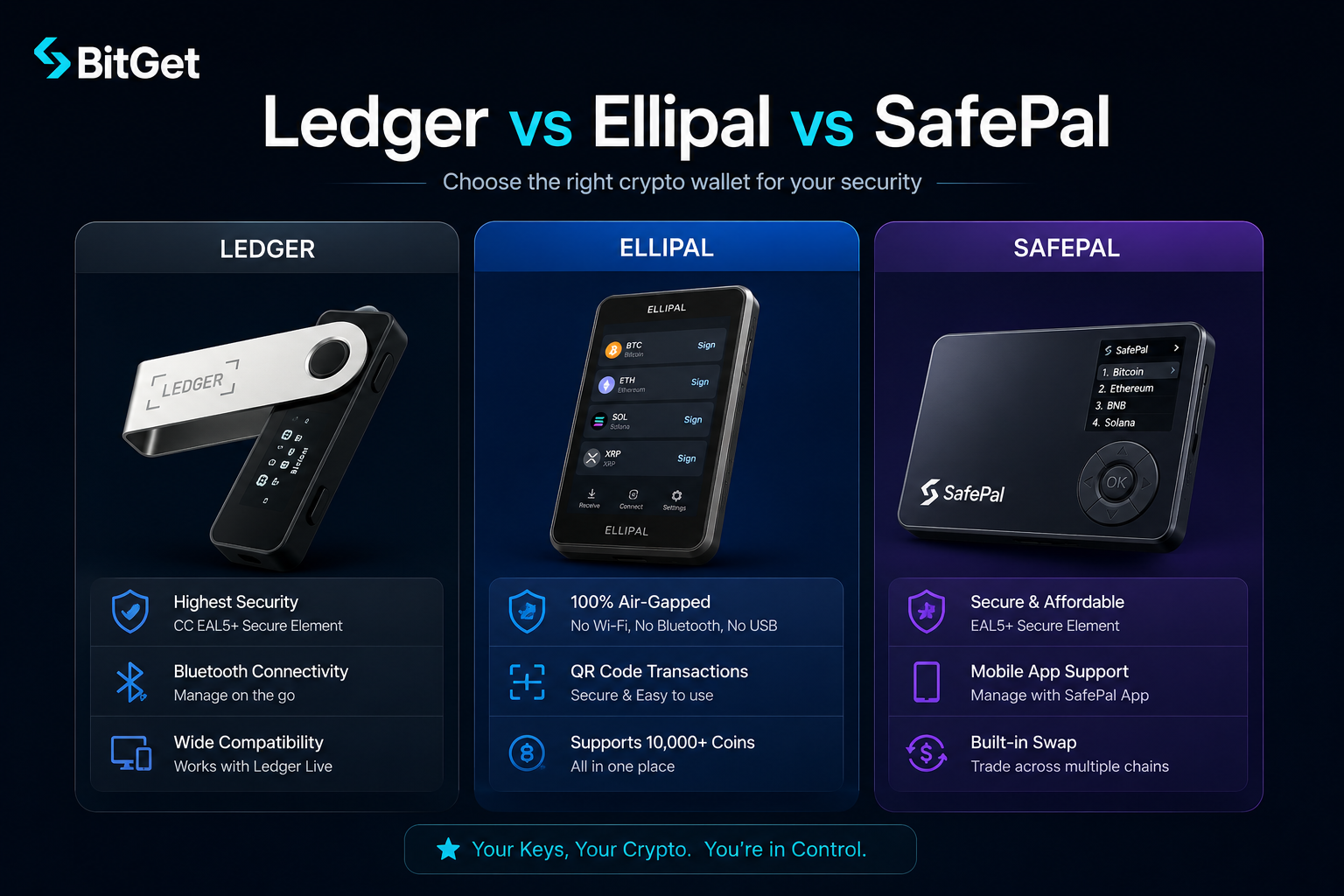
Short answer: Ledger Nano X wins on coin coverage (5,500+), Secure Element chip, and ecosystem maturity — best default for most users. Ellipal Titan 2.0 wins on pure air-gapped security with no USB or Bluetooth, best for high-value cold storage paranoia. SafePal S1 wins on price and air-gapped QR setup at a fraction of the cost — best budget pick. My main: Ledger Nano X (affiliate).
Key takeaways
- All three are cold wallets. Your private keys never leave the device. The differences are in coin support, attack surface, screen quality, and price.
- Ledger uses a certified EAL5+ Secure Element chip. Ellipal Titan 2.0 uses a general processor with anti-tamper sensors. SafePal S1 uses an EAL5+ Secure Element similar to Ledger.
- Ledger supports 5,500+ assets through Ledger Live. SafePal claims support for tens of thousands via DApp connections. Ellipal supports about 10,000+ coins.
- Price points: SafePal S1 around $50, Ledger Nano X around $149, Ellipal Titan 2.0 around $169.
- “Air-gapped” sounds like a clean win for Ellipal — but it adds friction every time you sign a transaction.
TL;DR comparison table
| Ledger Nano X | Ellipal Titan 2.0 | SafePal S1 | |
|---|---|---|---|
| Price | ~$149 | ~$169 | ~$50 |
| Connection | USB-C + Bluetooth | Fully air-gapped (QR) | Air-gapped (QR) |
| Secure Element | EAL5+ (CC EAL5+) | No SE — general MCU + anti-tamper | EAL5+ (CC EAL5+) |
| Screen | 128×64 OLED | 4-inch colour touchscreen | 1.3-inch colour |
| Coins supported | 5,500+ | 10,000+ | 30k+ (via DApps) |
| Companion app | Ledger Live (desktop + mobile) | Ellipal mobile app | SafePal mobile app |
| Battery | Built-in rechargeable | Built-in rechargeable | Built-in rechargeable |
| Open-source firmware | Partial | No | Partial |
| Best for | All-rounder default | High-value paranoid storage | Budget air-gapped |
What “air-gapped” actually means
Before getting into individual wallets, this term matters because it gets used loosely.
A properly air-gapped device:
- Has no USB data connection
- Has no Bluetooth
- Has no WiFi
- Has no NFC for data transfer
- Communicates with the outside world only via QR codes (camera + screen) or sometimes microSD
The argument for air-gapped is attack surface. Every connection method is a potential exploit path. USB has historically been compromised (BadUSB). Bluetooth has had vulnerabilities. Removing all of them shrinks the attack surface to zero except what you scan with the camera.
The argument against air-gapped is friction. Every transaction requires scanning a QR code from your phone, then the wallet signs it, then you scan the signed transaction back. That’s three to four QR scans per transaction. For high-value, low-frequency transactions it’s fine. For active trading it’s painful.
Where each wallet sits
- Ledger Nano X — USB-C and Bluetooth. Not air-gapped. Signed transactions go via the cable or Bluetooth.
- Ellipal Titan 2.0 — fully air-gapped. No USB data, no Bluetooth, no WiFi. QR codes only.
- SafePal S1 — air-gapped. QR codes only. No USB or Bluetooth data.
So on the air-gapped question specifically: Ledger no, Ellipal and SafePal yes.
Ledger Nano X: strengths and weaknesses
The default hardware wallet for most retail crypto users. I keep my long-term bag on one.
Strengths
Secure Element chip. The CC EAL5+ certified Secure Element is the same class of chip used in passports and bank cards. It’s purpose-built to resist physical and logical attacks. This is the single biggest technical advantage Ledger has over wallets that use general-purpose MCUs.
Coin coverage. 5,500+ assets supported natively through Ledger Live, including every major chain. Add another order of magnitude through connection to MetaMask, Phantom, and other software wallets.
Ecosystem maturity. Ledger has been operating since 2014. The software stack is mature, the documentation is good, and there’s a decade of third-party integrations.
Ledger Live app. Desktop and mobile companion app handles buying, swapping, staking, and portfolio tracking without leaving the secure setup. The mobile app uses Bluetooth to connect to the Nano X.
Bluetooth (the controversial bit). Bluetooth means you can sign transactions from your phone without a cable. The pairing uses authenticated encryption. The private keys never leave the device. It’s a convenience win that some people see as a security loss — both are arguable.
Weaknesses
The 2020 data breach. In July 2020, Ledger’s marketing database was hacked. Around 270,000 customer names, emails, phone numbers, and addresses were leaked. The hardware was not compromised and no funds were lost. But many users got targeted by phishing and physical-threat scams afterwards. The lesson: never give your real address when buying a hardware wallet if you can avoid it. The crypto scams guide covers the patterns.
Ledger Recover. In May 2023, Ledger announced a paid recovery service that splits an encrypted version of your seed across three custodians. The technical implementation requires firmware that can extract the seed under specific conditions. Many users were uncomfortable with the existence of that capability. Recover is opt-in and you have to pay for it — but the firmware capability exists on all current Ledgers. If that bothers you, Ellipal or SafePal don’t have an equivalent.
Not air-gapped. USB-C and Bluetooth mean Ledger is in the “connected” category, not the air-gapped category. For the threat model it defends against, that’s fine. If your threat model includes nation-state actors with USB exploit chains, it’s not.
Small screen. 128×64 OLED. Enough to verify addresses but cramped. You read addresses character by character.
Where to buy
Direct from Ledger (affiliate) is the only safe option. Never buy from Amazon or eBay — compromised devices have been documented. The Ledger Nano X review goes deeper on setup and best practices.
Ellipal Titan 2.0: strengths and weaknesses
Ellipal’s pitch is “fully air-gapped with a real touchscreen”. They’re the most uncompromising wallet in the air-gapped category for normal retail users.
Strengths
Properly air-gapped. No USB data port (charging only via a sealed magnetic dock), no Bluetooth, no WiFi, no NFC. QR codes are the only communication channel. Attack surface is very small.
Anti-tamper construction. The device is sealed inside a metal enclosure with internal sensors. If someone tries to physically open it, the device wipes itself. This isn’t unique to Ellipal but it’s well-implemented.
Large colour touchscreen. 4-inch colour display. Reading addresses and confirming transactions is significantly easier than on a Ledger’s tiny OLED. For users who care about UX, this is the standout feature.
Coin coverage. Supports around 10,000+ tokens across 40+ chains.
Standalone operation. The wallet doesn’t need a desktop computer at all. The phone-based companion app drives everything; the device just signs.
Weaknesses
No certified Secure Element. This is the big technical knock. Ellipal Titan 2.0 uses a general-purpose microcontroller with custom anti-tamper logic and a separate secure storage chip — not a CC EAL5+ certified SE like Ledger or SafePal. The anti-tamper design is good. But it’s not the same as a chip that’s specifically certified against side-channel and fault-injection attacks.
Closed-source firmware. Ellipal’s firmware is not open source. You’re trusting their build process and security audit, not the wider community’s review. Ledger is partially open source; SafePal publishes some components.
Friction on every transaction. Three to four QR scans per transaction. For long-term cold storage where you sign once a quarter, fine. For anything else, slow.
Companion app required. You can’t recover or use the wallet without the Ellipal mobile app. If the company goes away and the app stops working, you’d need to manually import the seed into a different wallet (which is possible because BIP39 is a standard).
Price. Most expensive of the three at around $169.
Who Ellipal is right for
If you have a high-value, low-frequency bag — meaningful money that you only need to touch a few times a year — Ellipal’s threat model fits well. If you’re trading regularly, the friction adds up fast.
SafePal S1 + X1: strengths and weaknesses
SafePal’s pitch is “Binance-backed, air-gapped, cheap”. The S1 is the original card-style wallet. The X1 is the newer, smaller form factor with a different button layout.
Strengths
Price. Around $50 for the S1. That’s a third of a Ledger Nano X and less than a third of an Ellipal Titan 2.0. For people getting started with cold storage, it’s the cheapest serious option.
Secure Element chip. The S1 uses an EAL5+ certified Secure Element. Same chip class as Ledger. This is the technical detail most “cheap wallet” reviews skip — SafePal is closer to Ledger on the chip than it is to Ellipal.
Air-gapped. QR codes only. No USB data. No Bluetooth. Same threat model as Ellipal on the connection side.
Wide coin coverage via DApp. SafePal’s mobile app connects to DApps across most major chains. The marketing claim of “30k+ tokens” is mostly DApp-mediated coverage rather than native integration — but functionally, you can interact with most ERC-20s, BEP-20s, SPL tokens, and so on through the app.
Backed by Binance Labs. SafePal received early funding from Binance Labs. That doesn’t mean Binance controls the wallet, but it does mean there’s institutional backing that reduces “company disappears” risk.
Weaknesses
Small screen. 1.3-inch colour. Better than Ledger’s monochrome OLED, much smaller than Ellipal’s 4-inch.
Button-based input. The S1 uses physical buttons, not a touchscreen. Navigation through long lists is slow. The X1 changes the form factor but doesn’t fundamentally fix this.
Companion app maturity. SafePal’s mobile app is functional but feels less polished than Ledger Live or Trust Wallet. Bugs and slow updates have been reported. Worth checking the latest reviews before buying.
Build quality. It’s a $50 device. It feels like a $50 device. Plastic body, less premium feel than Ledger or Ellipal. Mine works fine but you’re not paying for materials.
Closed-source firmware. Like Ellipal, mostly closed. You’re trusting the audit, not the community.
Who SafePal is right for
First-time hardware wallet buyer who wants air-gapped security without the Ellipal price tag. People who want to keep cold storage in a low-profile, deniable form factor. People who use SafePal’s DeFi-heavy mobile app already.
Coins supported: real comparison
The marketing numbers are misleading across all three. Here’s what actually matters.
Native vs DApp support
Native support means the wallet’s first-party companion app handles the chain end-to-end. DApp support means you connect the wallet to a third-party DApp (MetaMask, Phantom, Trust, etc.) and that handles the chain.
The two are not equivalent from a security standpoint. Native support means the signing flow is constrained to what the wallet manufacturer audited. DApp support means you’re trusting the third-party DApp’s implementation too — which means more attack surface.
| Wallet | Native | DApp-mediated (claimed) |
|---|---|---|
| Ledger Nano X | 5,500+ | Tens of thousands via MetaMask, Phantom, etc. |
| Ellipal Titan 2.0 | ~10,000 | Limited DApp connectivity |
| SafePal S1 | ~1,000 native | 30,000+ claimed via SafePal mobile DApp browser |
If your portfolio is BTC, ETH, SOL, and a few majors, all three work natively. If you hold long-tail tokens, Ledger and SafePal handle them via MetaMask/Phantom connections better than Ellipal does.
Companion apps: the daily UX
The wallet is a third of the experience. The companion app is the other two-thirds.
Ledger Live
Desktop and mobile. Best-in-class portfolio view. Built-in buy/sell via on-ramp providers. Native staking for ETH, SOL, ATOM, DOT, and others. Swap functionality. Account history. Plays nicely with MetaMask, Phantom, Rabby, and most DeFi wallets via connection.
Mobile app uses Bluetooth to connect to Nano X. Desktop uses USB.
Ellipal app
Mobile-only, no desktop. Decent portfolio view. Built-in buy through partners. Limited DApp connectivity. The whole signing flow is QR-based, so the app generates QR codes that the device camera scans.
Cleaner than I expected. Polished UX. Limited if you want to do DeFi or use third-party DApps.
SafePal app
Mobile-only. Portfolio view is functional but not polished. The big feature is the in-app DApp browser, which lets you connect to most DeFi protocols across major chains. This is where SafePal’s “30k+ tokens” claim comes from — it’s the DApp coverage, not first-party integration.
Some users like the DApp browser. Some prefer the constrained, native-only experience of Ledger or Ellipal because it has less attack surface.
QR-code air-gapped vs USB: the real tradeoff
Here’s the honest version of this argument.
USB/Bluetooth (Ledger)
- Pros: fast signing, one-tap transactions, smooth integration with desktop apps
- Cons: theoretical exploit paths via USB or Bluetooth, requires trust in the host computer
QR-code air-gapped (Ellipal, SafePal)
- Pros: no electrical connection means no USB or Bluetooth exploit class, attack surface is small
- Cons: three to four scans per transaction, slower workflows, harder to integrate with DeFi DApps
The threat model question: how much do you actually need to defend against USB-based attacks? For most retail users, the answer is “very little, because my desktop isn’t being targeted by APT-tier exploits”. For high-value, low-frequency cold storage, the answer is “more than I’d like to admit, because if I’m holding eight figures someone might actually try”.
Reality check
In the documented hardware wallet losses I’ve read about, almost none came from USB or Bluetooth exploits. They came from:
- Lost or stolen seed phrases (user error)
- Phishing pages that got users to enter their seed
- Buying compromised devices from third parties (Amazon, eBay)
- Physical theft + threat of violence (the “$5 wrench attack”)
The connection method matters less than seed phrase hygiene. The seed phrase storage post covers the practices that actually defend against the real attack vectors.
Price comparison and value
| Wallet | RRP | Where to buy |
|---|---|---|
| Ledger Nano X | $149 | shop.ledger.com (affiliate) — direct only |
| Ellipal Titan 2.0 | $169 | ellipal.com direct |
| SafePal S1 | $50 | safepal.com direct or authorised resellers |
Never buy any hardware wallet from Amazon, eBay, or a third-party marketplace. Compromised “tampered seed phrase” devices have been documented across all brands. The cost of buying direct is the cost of certainty.
If price is the deciding factor and you don’t already have a cold wallet — buy a SafePal S1 today rather than wait six months to save up for a Ledger. Cold storage is binary. Any cold wallet beats no cold wallet.
NordVPN and operational security
Cold wallets defend the keys. They don’t defend the desktop you sign from or the WiFi network you’re on. If a session token gets sniffed and the attacker gains access to a connected hot wallet or exchange account, the cold wallet didn’t help.
I use NordVPN (affiliate) on every device I trade or sign from, especially on public networks. It’s a 90-second setup and a non-issue from then on.
The 2FA for crypto guide covers the broader account-hardening checklist.
Who should buy which
Buy Ledger Nano X if: you want a default cold wallet, you hold a wide range of tokens, you want mature software, you don’t mind USB/Bluetooth connectivity, and you’ll actually use the staking and swap features in Ledger Live.
Buy Ellipal Titan 2.0 if: you have a high-value bag that you only need to touch occasionally, you want maximum air-gapped paranoia, you value a big colour touchscreen, and you’re willing to pay for the build quality.
Buy SafePal S1 if: you want cold storage on a budget, you can live with a smaller screen, you primarily want to interact with DeFi through the SafePal mobile DApp browser, and you’d rather have an air-gapped $50 wallet now than wait to afford a Ledger or Ellipal.
Buy more than one if: your holdings are large enough that key-loss redundancy matters. A multi-sig setup across two or three different wallet brands defends against firmware-level vulnerabilities in any single one. The multisig explained post covers the setup.
What I actually use
I keep my long-term bag on a Ledger Nano X (affiliate). I bought direct, never plugged it into a shared computer, and I keep the seed phrase split across two physical locations.
That’s it. No magic. The wallet I picked matters less than the disciplines around it — buying direct, not photographing the seed, rehearsing recovery, and keeping the trading float on the exchange small enough that losing it wouldn’t ruin me.
If you want the wider playbook: how to store crypto safely and hot vs cold wallet cover the full system. The Ledger vs Trezor comparison is the other obvious head-to-head if you’re choosing a wallet today.
Learn the rest properly
If you want to actually learn how to manage a serious crypto portfolio — risk sizing, when to take profit, how to rotate from spot into cold storage — Trade Travel Chill is the community I’m part of. Hardware wallets are one third of the puzzle; the other two are knowing when to buy and when to move. See Trade Travel Chill → (affiliate).
Ready to get your bag off the exchange?
A Ledger Nano X is the wallet I actually use. Buy direct from Ledger — never from third-party marketplaces.
Affiliate link. I may earn a commission at no extra cost to you.
Frequently asked questions
Is Ledger or Ellipal safer?
Both are safe used correctly. Ledger has a certified Secure Element chip, which is the strongest technical credential. Ellipal is fully air-gapped, which removes the USB and Bluetooth attack class entirely. The “safer” answer depends on which threat model you’re defending against.
Is SafePal as safe as Ledger?
SafePal S1 uses the same class of EAL5+ Secure Element chip as Ledger. On the chip-level security, they’re equivalent. SafePal is air-gapped where Ledger is not. Ledger has more mature software and a longer track record. Both are safer than any hot wallet by a wide margin.
What’s the cheapest hardware wallet that’s actually safe?
SafePal S1 at around $50 is the cheapest hardware wallet with a certified Secure Element chip. It’s a serious cold storage option, not a toy.
Is air-gapped better than USB?
For high-value, low-frequency cold storage, yes — the attack surface is smaller. For active use where you sign multiple transactions a week, the friction usually outweighs the security benefit for a normal retail threat model.
Can I use Ledger with MetaMask?
Yes. Ledger connects to MetaMask via USB (desktop) or Bluetooth (mobile). The Ledger signs every transaction, so even if MetaMask is compromised, your keys are safe.
Does Ellipal support Solana?
Yes. Ellipal Titan 2.0 supports Solana along with most other major chains.
Where should I buy a hardware wallet?
Direct from the manufacturer only. Ledger from shop.ledger.com, Ellipal from ellipal.com, SafePal from safepal.com or authorised resellers. Never Amazon, eBay, or third-party marketplaces — compromised devices have been documented.
Do I need a hardware wallet for under $1,000 in crypto?
Worth considering even at smaller amounts. A SafePal S1 at $50 is 5% of $1,000 — cheap insurance against losing the lot to an exchange collapse or hot wallet hack. The hot vs cold wallet post breaks down when cold storage starts to make sense.
Related posts
- Ledger Nano X Review
- Ledger vs Trezor: Which Hardware Wallet?
- How to Store Crypto Safely: The Self-Custody Guide